

A Secure Guide to Disposing of Old Hard Drives Safely
Why Proper Hard Drive Disposal Protects Your Data and the Environment
When you dispose of old hard drives, you face two critical risks: exposing sensitive personal or business data to identity thieves, and releasing toxic materials into the environment. The good news is that secure disposal is straightforward when you follow the right steps.
Quick Answer: How to Dispose of Old Hard Drives Safely
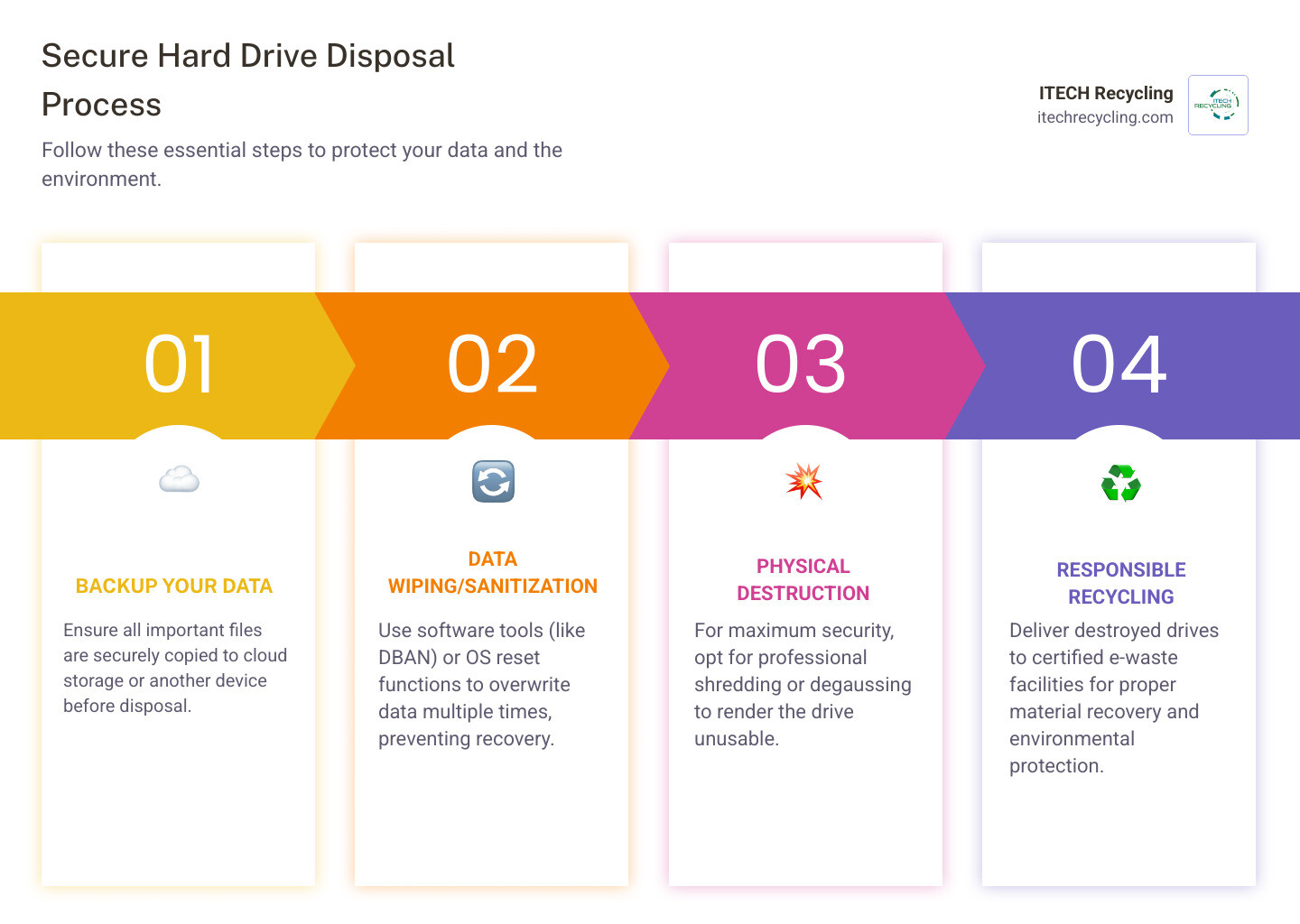
- Back up your data to cloud storage or an external device
- Wipe the drive using software like DBAN or built-in OS reset tools
- Physically destroy the drive through professional shredding (ideal for sensitive data)
- Recycle responsibly through certified e-waste programs
Important: Simply deleting files or formatting does NOT remove your data. Files remain recoverable until properly overwritten or physically destroyed.
Your old computer might feel worthless, but the hard drive inside contains a treasure trove of information. Financial records, passwords, tax returns, family photos, and business documents all sit waiting on those magnetic platters or flash memory chips. When you delete a file, your computer only removes the pointer to that data—the actual information stays intact and recoverable with basic software tools.
The numbers tell a sobering story. In 2022, manufacturers shipped 67.2 million PCs globally. Each one eventually reaches end-of-life, and improper disposal creates real risks. Identity thieves with minimal technical skills can extract banking details, social security numbers, and login credentials from discarded drives. Meanwhile, hard drives contain hazardous materials like heavy metals that leak toxic chemicals into soil and groundwater when dumped in landfills.
For businesses, the stakes climb even higher. Regulations like GDPR and CCPA impose strict requirements for data protection, with severe penalties for breaches. A single improperly disposed hard drive containing customer information can result in legal liability, financial losses, and reputation damage.
The solution isn’t complicated, but it requires following specific steps. You need to understand the difference between deletion and true sanitization, choose the right destruction method for your situation, and ensure your old drives end up at certified recycling facilities rather than landfills.
I’m Felix Bagr, owner of iTech Recycling, where I’ve helped businesses and individuals dispose of old hard drives securely while maximizing material recovery and minimizing environmental impact. Through thousands of recycling projects, I’ve seen what happens when people skip proper disposal steps—and how simple it is to do it right.
Why You Must Properly Dispose of Old Hard Drives
When it comes time to upgrade your tech, it’s easy to focus on the shiny new laptop and forget about the one gathering dust in your closet. However, the decision to dispose of old hard drives correctly is one of the most important security choices you can make.
The Identity Theft Risk
Think about everything you do on your computer. You likely have saved passwords, tax returns, medical records, and perhaps even digital copies of your birth certificate or social security card. Statistics show that data is still recoverable even after it has been moved to the trash or recycle bin. When you “delete” a file, your computer simply sets a marker on the hard drive to indicate that space is available for new data. The original bits and pieces remain until they are overwritten. Without proper removal, anyone with basic software can retrieve your information and wreak havoc on your finances.
Environmental Responsibility
Beyond your personal security, there is a massive environmental component. Computers contain hazardous materials like lead, mercury, and cadmium. According to the Environmental Protection Agency’s Electronics Donation and Recycling page, these materials do not belong in a landfill. If a hard drive is simply tossed in the trash, those toxic chemicals can leak into the earth, contaminating local water supplies.
Legal and Compliance Requirements
For our business partners in Chicago, Naperville, or Aurora, the stakes are even higher. Businesses are legally obligated to protect proprietary and customer data. We often discuss more info about secure data destruction with clients who must comply with:
- GDPR (General Data Protection Regulation): Even if you are a small business in Evanston, if you handle data for EU citizens, you are liable.
- CCPA (California Consumer Privacy Act): Similar to GDPR, this sets a high bar for data privacy that many Illinois businesses follow as a best practice.
- NIST 800-88 Standards: These are the “gold standard” guidelines for media sanitization. Following these ensures that data is rendered irretrievable even by laboratory-grade recovery techniques.
Deletion vs. Sanitization: Understanding the Difference
One of the most common misconceptions we encounter is that “deleting” files or “formatting” a drive is enough. It isn’t. To truly dispose of old hard drives safely, you must understand the hierarchy of data removal.
| Method | What it Does | Recoverability |
|---|---|---|
| Deletion | Removes the file “address” but leaves the data on the platter. | Very High (Easy to recover with free tools). |
| Formatting | Clears the address table and “re-maps” the drive. | High (Data can still be found using forensic software). |
| Sanitization | Overwrites every bit of data with random patterns multiple times. | Extremely Low (Meets NIST standards). |
| Physical Destruction | Shreds or crushes the drive into tiny pieces. | Zero (Data is physically gone). |
The NIST Special Publication 800-88 Guidelines for Media Sanitization describes “Clear,” “Purge,” and “Destroy” as the three levels of sanitization. While “clearing” might work for a drive you plan to give to a family member, “destroying” is the only option for drives leaving your control entirely.
We often explain the difference between data disposal vs. data destruction to our clients in Des Plaines. Disposal is simply getting rid of the hardware; destruction is the process of making the data unreadable forever. This often involves “crypto erase” (deleting the encryption keys for self-encrypting drives) or multiple overwriting passes that replace your sensitive files with meaningless binary code.
Step-by-Step: How to Dispose of Old Hard Drives Securely
If you are preparing to get rid of a device in Springfield or Bloomington, follow this checklist to ensure you don’t leave your digital life behind.
1. Back Up Your Information
Before you do anything else, make sure you have what you need. Transfer your photos, documents, and videos to a new computer, a secure cloud service, or an external USB drive.
2. Disconnect and Unlink Accounts
Log out of your Apple ID, Google Account, and Microsoft account. On Windows, you should also Reset your PC in Windows. When performing a reset, always choose the “Remove everything” and “Clean the drive” options. This takes longer but is much more secure.
3. Remove Removable Media
Check for SD cards, USB dongles, or even old CDs/DVDs left in the drive. These are often overlooked but can contain significant amounts of personal data.
4. Professional Sanitization
For residents in Schaumburg or Elgin, we recommend looking into how responsible computer recycling prevents data breaches. This involves ensuring the drive is wiped at a bit-level before it ever leaves a secure facility.
Physical Destruction: The Ultimate Way to Dispose of Old Hard Drives
If you want 100% certainty that your data can never be seen again, physical destruction is the answer. This is the “nuclear option” of data security.
At iTech Recycling, we use industrial shredders that turn a hard drive into a pile of confetti. For maximum security, the pieces must be small enough that the information cannot be reconstructed; a size of 1/125 inch is the ideal standard. There are 5 reasons to choose hard drive shredding services, including the fact that it makes the platters completely “unspinnable.”
For businesses in Chicago or Wood Dale, we use heavy-duty equipment that applies up to 40,000 lbs of shearing force. This doesn’t just bend the drive; it breaks the internal platters into thousands of unidentifiable shards.
Software Wiping and Degaussing to Dispose of Old Hard Drives
If you intend to donate or resell your computer, you might want to keep the hardware intact. In this case, software wiping is your best friend.
- DBAN (Darik’s Boot and Nuke): This is a legendary free tool that completely obliterates data on traditional hard drives (HDDs). It runs from a USB stick and overwrites the drive multiple times.
- Built-in Tools: If you have an Apple device, you should Erase all content and settings on Mac. Modern Macs use encrypted storage, and this process effectively deletes the encryption keys, rendering the data scrambled and useless.
- Degaussing: This method uses powerful magnets to disrupt the magnetic field on a drive. While highly effective for older HDDs and backup tapes, it is not effective for modern Solid State Drives (SSDs), which do not store data magnetically.
We provide comprehensive hard drive shredding and data destruction services that account for these differences. We know that an SSD in Arlington Heights requires a different approach than an old magnetic server drive in Bensenville.
Common Mistakes and Ineffective Methods to Avoid
We’ve heard it all when it comes to DIY drive destruction. While some of these methods might sound like a fun Saturday afternoon project, they often fail to actually protect your data.
- The Household Magnet: Your refrigerator magnets (or even strong craft magnets) aren’t powerful enough to erase a modern hard drive. Modern drives are shielded against magnetic interference.
- The “One Hole” Drill Method: Drilling a single hole through a hard drive is a popular tip, but it’s incomplete. Data recovery experts can often still retrieve data from the undamaged portions of the platters. If you drill, you need to drill many holes through the entire platter area.
- The Hammer: Bashing a drive with a hammer is satisfying, but dangerous. You risk flying metal shards and toxic dust. Furthermore, if you only dent the casing, the internal platters might remain intact.
- Microwaving or Burning: Never do this. Burning electronics releases toxic fumes that are incredibly harmful to your health and the environment. Microwaving a hard drive will likely just result in a fire in your kitchen without actually destroying the data platters inside.
- Acid Soaking: This is another hazardous method that creates a chemical waste nightmare without guaranteeing that the data bits are gone.
When exploring data destruction in Chicago, it becomes clear that professional methods are safer, cleaner, and much more reliable.
Professional Services and Compliance for Businesses
For organizations in Franklin Park, Mundelein, or Elk Grove Village, data security isn’t just a good idea—it’s a legal mandate. When we handle IT Asset Disposition in Chicago, we provide a full chain of custody.
The Certificate of Destruction
When you work with a professional like iTech Recycling, you don’t just take our word for it. You receive a Certificate of Destruction. This document includes the serial numbers of the drives destroyed and serves as your legal proof of compliance for audits.
WEEE and Environmental Policy
The WEEE (Waste Electrical and Electronic Equipment) environmental policy promotes the re-use and recycling of electronic waste. We ensure that once the data is destroyed, the raw materials—aluminum, gold, copper, and plastic—are recovered and sent back into the manufacturing stream.
Compliance Standards
Whether you are a medical office in Hawthorn Woods needing HIPAA compliance or a bank in Vernon Hills following FACTA laws, professional destruction is the only way to meet these rigorous standards. We offer both on-site destruction (where we bring the shredder to you) and off-site destruction at our secure facilities.
Frequently Asked Questions about Hard Drive Disposal
Is formatting a hard drive enough to protect my data?
No. Formatting is like removing the table of contents from a book. The chapters (your data) are still there; you just can’t see them easily. A person with recovery software can “re-index” the drive and find your files. To truly dispose of old hard drives, you must overwrite the data or physically destroy the media.
Can I dispose of SSDs the same way as traditional HDDs?
Not exactly. SSDs (Solid State Drives) store data on flash memory chips rather than magnetic platters. Degaussing does nothing to an SSD. While software wiping works, SSDs have a feature called “wear leveling” that can sometimes hide data from wiping software. For SSDs, we strongly recommend physical shredding or using the manufacturer’s specific “Secure Erase” utility.
Where can I find certified e-waste recycling events?
Many communities in the Chicago area, including Bolingbrook and Aurora, host seasonal recycling events. You can also check the Environmental Protection Agency’s Electronics Donation and Recycling page for a list of certified recyclers in your area.
Conclusion
At iTech Recycling, we believe that protecting your data and protecting our planet go hand-in-hand. Whether you are an individual in Evanston with one old laptop or a major corporation in Naperville with a data center full of servers, the goal is the same: secure, responsible disposal.
By choosing to dispose of old hard drives through a professional service, you ensure that your personal information stays private, your business remains compliant with the law, and hazardous materials stay out of Illinois landfills. We are proud to serve the Chicago area, from Glenview to Springfield, providing a sustainable path for the technology that powers our lives.
Ready to clear out your old tech? Let us handle the heavy lifting and the security risks. Check out our Secure Hard Drive Shredding and Data Destruction services today and breathe easy knowing your data is gone for good.
 Prev
Prev