

Essential Electronic Data Destruction Guide
Understanding Secure Electronic Data Destruction
Electronic data destruction is the process of permanently erasing or physically destroying data stored on digital devices so it cannot be recovered or accessed by unauthorized parties. Organizations and individuals need secure data destruction to protect sensitive information, comply with legal regulations, and prevent data breaches that can result in financial penalties and reputation damage.
Key Methods of Electronic Data Destruction:
- Software Overwriting – Writing random data patterns over existing files multiple times to make recovery infeasible
- Degaussing – Using powerful magnetic fields to disrupt data stored on magnetic media like hard drives and tapes
- Physical Shredding – Mechanically destroying devices into particles as small as 2 millimeters, the most reliable method for permanent data erasure
- Cryptographic Erase – Destroying encryption keys to render encrypted data permanently inaccessible
Why It Matters:
Simply deleting files or reformatting drives doesn’t actually remove data. In a recent study of 100 hard drives purchased online, the majority still contained recoverable residual data. In 2022, Morgan Stanley Wealth Management paid $35 million in fines after the SEC charged them with failure to properly dispose of millions of customers’ personal information.
Different storage media require specific destruction methods. Hard disk drives respond to degaussing and overwriting, while solid-state drives (SSDs) need physical shredding due to their flash memory architecture. Optical media like CDs and DVDs must be physically destroyed since overwriting isn’t possible.
Compliance requirements vary by industry and region but commonly include GDPR, HIPAA, PCI-DSS, and NIST SP 800-88 standards. Organizations must document their destruction processes with certificates that include device serial numbers, destruction methods used, and dates of service.
At ITECH Recycling, we help businesses build compliant electronic data destruction programs that keep sensitive information out of the wrong hands while supporting environmental sustainability. In this guide, you will learn how to choose the right destruction method for your specific media and risk level, document the process properly, and stay aligned with relevant regulatory requirements.
Why Electronic Data Destruction is Critical for Modern Organizations
In our digital-first world, data is the most valuable asset a company owns—and the most dangerous if it falls into the wrong hands. We often see businesses focusing heavily on firewalls and antivirus software, only to leave the “back door” wide open by tossing old hard drives in a storage closet or a standard trash bin.

The consequences of improper disposal are no longer just a “slap on the wrist.” They are massive financial and reputational hits. Take the SEC Morgan Stanley fine as a cautionary tale. In 2022, they were charged $35 million because they failed to properly decommission thousands of hard drives and servers that contained the personal identifying information (PII) of millions of customers. Some of that equipment, still loaded with data, was actually sold to third parties.
It isn’t just the “big fish” that are at risk. A recent data recovery study looked at 100 hard drives purchased from online marketplaces and found that the majority contained residual data. This means that regular people and small businesses are unknowingly handing over their bank statements, tax returns, and private emails to strangers. For businesses in our local community, ensuring secure data destruction in Chicago is the only way to sleep soundly at night.
The Risks of Improper Disposal
When we talk about data recovery, we aren’t just talking about someone hitting “undo.” Sophisticated recovery software can pull information from drives that have been reformatted or even partially damaged. This residual information is a goldmine for identity thieves and corporate spies.
Unauthorized access can occur at any point in the “trash” cycle. If a drive isn’t destroyed, it can be intercepted during transport, stolen from a warehouse, or recovered from a landfill. This is why the NCSC guidance on end-user device reset emphasizes that a simple factory reset is often insufficient for high-security data; it’s merely a starting point, not a final solution.
Legal and Regulatory Requirements
If the fear of hackers doesn’t move you, the legal requirements should. Depending on where you operate and what kind of data you handle, you are likely bound by several strict regulations:
- General Data Protection Regulation (GDPR): Even if you are based in Illinois, if you handle data for EU citizens, you must comply with these strict privacy rules, which include the “right to be forgotten” and secure disposal mandates.
- Fair and Accurate Credit Transactions Act (FACTA): This U.S. law requires businesses to take “reasonable measures” to protect against unauthorized access to consumer information during its disposal.
- Gramm-Leach-Bliley Act (GLBA): For financial institutions, this act mandates the protection of customer records, including secure destruction at the end of the data’s life.
- PIPEDA: For those doing business in Canada, this act outlines how personal information must be handled and disposed of securely.
Compliance audits aren’t just paperwork; they are a deep dive into your chain of custody. If you can’t prove exactly when and how a drive was destroyed, you are technically out of compliance.
Common Methods of Electronic Data Destruction
Not all destruction methods are created equal. Choosing the right one depends on the type of media you have and the level of security you need.
| Method | Best For | Security Level | Pros | Cons |
|---|---|---|---|---|
| Overwriting | Reusable HDDs | Moderate | Cost-effective, allows reuse | Time-consuming, potential for human error |
| Degaussing | Magnetic Tapes, HDDs | High | Fast, renders data unrecoverable | Destroys the drive, doesn’t work on SSDs |
| Physical Shredding | All Media (SSDs, HDDs, USBs) | Highest | Visual proof, 100% effective | Device is completely destroyed |
We always point clients toward the NCSC guidance on secure sanitisation to help them understand that “deleting” is just hiding. For a deeper dive, check out our 5 reasons to choose hard drive shredding.
Software Overwriting and Wiping
This is a logical erasure method. Instead of breaking the drive, software writes patterns of meaningless random data over every single sector of the drive. For older ATA disk drives (manufactured after 2001 and larger than 15GB), a single overwrite pass is often considered sufficient to protect against most recovery attempts. However, for higher security, many organizations still perform three or more passes.
The NCSC Cloud Security sanitisation principles highlight that overwriting is essential in cloud environments where physical destruction isn’t an option for the end-user.
Degaussing for Magnetic Media
Degaussing is like a “reset button” for anything magnetic. It uses a massive electromagnetic pulse to scramble the magnetic domains on a hard drive platter or magnetic tape. This returns the media to a “zero state.”
It’s incredibly effective for magnetic tapes like LTO or DLT, but it has a major drawback: it renders modern hard drives completely inoperable because it destroys the factory-set firmware. It also does absolutely nothing to Solid State Drives (SSDs), which don’t store data magnetically.
Physical Shredding: The Gold Standard for Electronic Data Destruction
If you want to be 100% sure that data is gone, you have to break the physical thing that holds it. Industrial media shredders work like giant versions of the paper shredders in your office, but they are built to chew through steel, aluminum, and silicon.
Shredding can reduce a device to pieces no larger than 2 millimeters. This is particularly important for SSDs, which store data on tiny flash memory chips. If you just drill a hole through an SSD, you might miss the specific chip that holds your most sensitive files. Shredding ensures every chip is pulverized. We offer comprehensive hard drive shredding and data destruction services for businesses across the Chicago area to ensure this level of total obliteration.
Navigating Global Standards and Compliance Frameworks
When we work with government agencies or healthcare providers, we don’t just “guess” at how to destroy data. We follow established frameworks that provide a roadmap for security.
The most cited standard is the NIST SP 800-88 Guidelines. While the Department of Defense used to rely on DoD 5220.22-M, NIST has become the modern gold standard because it addresses newer technologies like SSDs and mobile devices.
Other important standards include:
- PCI-DSS: Essential for any business that processes credit cards.
- DIN 66399: A European standard that classifies security levels for different types of media.
- Data destruction for businesses: Our guide for local businesses in Palatine and beyond on why these standards matter for your specific industry.
Understanding NIST SP 800-88: Clear, Purge, and Destroy
NIST breaks down sanitization into three categories based on the confidentiality of the data:
- Clear: This is basic overwriting. It protects against simple data recovery tools but might not stop a dedicated laboratory attack.
- Purge: This uses more advanced techniques like degaussing or “Secure Erase” commands to render data irrecoverable even with laboratory equipment.
- Destroy: This is the physical destruction of the media. It is the only option for media that is damaged or when the highest level of security is required.
These categories help organizations make risk-based decisions. If you’re disposing of a drive that held public marketing materials, “Clear” might be fine. If it held tax records, you’ll want to follow IRS Publication 1075 and go for “Destroy.”
Verification and Documentation Requirements
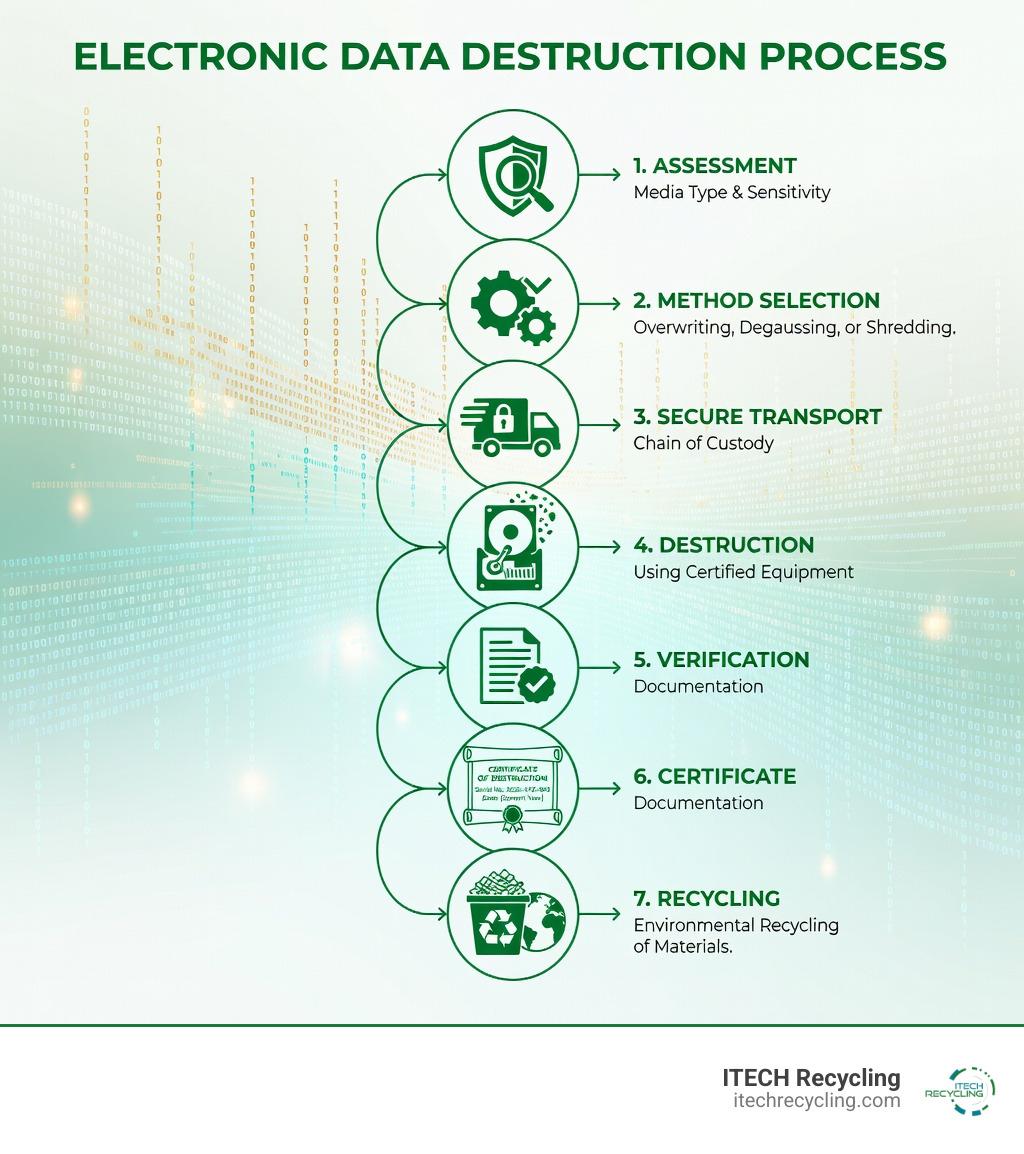
A job isn’t finished until the paperwork is done. To stay compliant, you need a verifiable audit trail. This includes a Certificate of Destruction which should list the serial number of every device destroyed, the method used, and the date.
Maintaining a secure chain of custody is also vital. This means tracking the device from the moment it leaves your desk until it hits the shredder. Understanding the difference between data disposal vs data destruction is key here—disposal is just getting rid of it; destruction is a certified, documented process.
Best Practices for Secure Electronic Data Destruction
Over the years, we’ve seen what works and what doesn’t. Here are our top recommendations for setting up a secure program:
- Employee Training: Your staff is your first line of defense. They need to know that an old USB stick can’t just go in the blue recycling bin.
- Asset Tracking: You should have a list of every device your company owns. When a laptop is retired, it should be checked off that list only after you have a destruction certificate for its drive.
- On-Site vs. Off-Site: For maximum security, some businesses prefer on-site shredding where the truck comes to them. Others find off-site services more cost-effective. We provide both options to fit different needs.
- Safeguarding Proprietary Data: Whether you are in Bolingbrook or Naperville, safeguarding proprietary data requires a consistent policy that leaves no room for “accidental” leftovers.
Environmental Sustainability and E-Waste Recycling
Electronic data destruction doesn’t have to be bad for the planet. In fact, it’s a huge part of the “circular economy.” Once a hard drive is shredded, the aluminum, steel, and copper can be separated and sent to refineries to be turned into new products.
E-waste contains toxic substances like lead, mercury, and cadmium. If these end up in a landfill, they can leak into the groundwater. By using a responsible recycler, you ensure these materials are handled safely. We believe in hard disk recycling for privacy and the planet, proving that security and sustainability can go hand-in-hand.
Choosing a Qualified Service Provider
When you’re looking for a partner in the Chicago area, don’t just go with the cheapest option. Look for:
- Compliance Certification: Are they R2 or NAID certified?
- Insurance Coverage: Do they have professional liability insurance to protect you in case of a breach?
- Secure Transport: Do they use GPS-tracked vehicles and locked bins?
Whether you need data destruction in Franklin Park or a pickup in Evanston, ensure your provider can give you a clear, documented process from start to finish.
Frequently Asked Questions about Electronic Data Destruction
Is deleting or reformatting a drive sufficient for data security?
No. When you “delete” a file, the computer just removes the pointer to that data and marks the space as “available.” The actual data stays on the drive until it is overwritten by something else. Specialized software can easily “un-delete” these files. Reformatting is slightly better but still leaves the majority of the data intact. Only electronic data destruction methods like shredding or purging ensure the data is gone for good.
How does destruction differ for HDDs versus SSDs?
Hard Disk Drives (HDDs) store data on magnetic platters. They can be degaussed or overwritten. Solid State Drives (SSDs) store data on flash memory chips. Degaussing has zero effect on SSDs. Furthermore, because SSDs use “wear leveling” to spread data across the chips, overwriting can sometimes miss small pockets of data in unallocated space. For SSDs, we always recommend physical shredding to a very small particle size (2mm) to ensure every memory chip is destroyed.
What should be included in a Certificate of Destruction?
A valid certificate should be your “get out of jail free” card for an audit. It must include:
- The date and time of destruction.
- The specific method used (e.g., shredding to 2mm).
- A list of device serial numbers.
- The name of the technician who performed the work.
- A statement of compliance with standards like NIST 800-88.
Conclusion
At ITECH Recycling, we take the stress out of e-waste management. From our home base in Chicago to our service areas in Wood Dale, Bensenville, Franklin Park, Mundelein, Deerfield, Naperville, Elgin, Springfield, Evanston, Elk Grove Village, Bloomington, Glenview, Hawthorn Woods, Vernon Hills, Bolingbrook, Aurora, and Arlington Heights, we are committed to providing the highest level of security.
We don’t just toss your old electronics in a bin. We provide a rigorous, documented process that focuses on data security, legal compliance, and environmental sustainability. We ensure that hazardous materials stay out of our local landfills and that your business’s reputation remains untarnished.
Ready to secure your data? Contact us today for Secure Hard Drive Shredding and Data Destruction and let us help you close the book on your old data—permanently.
 Prev
Prev