

How to Securely Destroy Data Without Breaking a Sweat
The Real Risk Behind Improper Data Destruction Methods
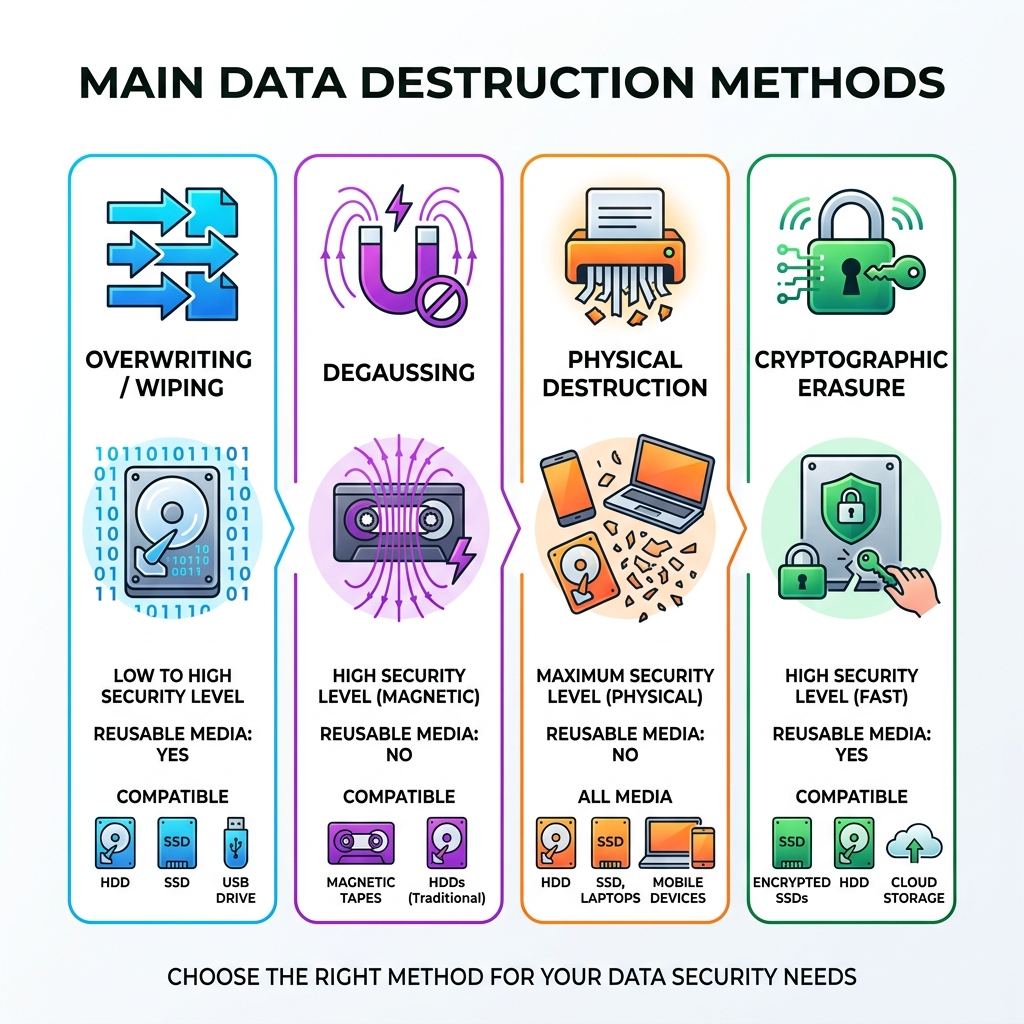
Data destruction methods are the techniques used to permanently eliminate data from storage devices so it can never be recovered. Here’s a quick comparison of the main approaches:
| Method | How It Works | Best For | Reusable After? |
|---|---|---|---|
| Overwriting/Wiping | Writes new data over old data | HDDs, reusable drives | Yes |
| Degaussing | Disrupts magnetic fields | Magnetic media (HDDs, tapes) | No |
| Physical Destruction | Shreds, crushes, or pulverizes | End-of-life media | No |
| Cryptographic Erasure | Destroys encryption keys | SSDs, cloud storage | Yes |
Most people assume deleting files or reformatting a drive wipes it clean. It doesn’t.
A recent study of 100 second-hand hard drives purchased online found that the majority still contained recoverable data. And a survey of IT professionals found that 56% incorrectly believed a full reformat permanently erases data. It doesn’t — it just removes the roadmap to the data, leaving the data itself intact.
The consequences of getting this wrong are serious. Morgan Stanley Wealth Management was fined $35 million by the SEC after failing to properly dispose of devices containing millions of customers’ personal information. Meanwhile, there were 20% more US data breaches in the first nine months of 2023 than in any prior year on record.
Whether you’re a business retiring old servers or a healthcare provider upgrading workstations, choosing the right data destruction method isn’t optional — it’s a legal and ethical responsibility.
At ITECH Recycling, we’ve spent years helping businesses across the Chicago area navigate secure, compliant data destruction methods as part of responsible electronics recycling. In this guide, we’ll walk you through every major technique, how they compare, and how to choose the right one for your situation.
Key terms for data destruction methods:
Introduction
When we talk about the information lifecycle, we aren’t just talking about how data is created or stored; we are talking about its final, most critical stage: its end. This is where many organizations stumble. The concept of data remanence—the residual data that remains on a storage device even after a “delete” command—is a massive security hole.
At ITECH Recycling, we view data sanitization as a precise process. It’s the difference between throwing a sensitive document in the trash and burning it to ash. For businesses in Chicago and surrounding suburbs like Wood Dale and Bensenville, understanding the stages of media sanitization is the first step toward true security. Whether you are dealing with magnetic hard drives or modern solid-state drives (SSDs), the goal is to make the data irretrievable to anyone, regardless of the tools they use.
Why Organizations Prioritize Professional Data Destruction Methods
In the modern business landscape, data is both your most valuable asset and your greatest liability. According to a report on data breaches, the sheer volume of compromised records is staggering. For an organization, a single lost laptop or an improperly recycled server can lead to identity theft, the loss of intellectual property, and catastrophic reputational damage.
The financial stakes are just as high. Beyond the Morgan Stanley SEC Settlement, where a failure to oversee the decommissioning of data centers led to a $35 million penalty, companies face strict regulatory fines under HIPAA, GDPR, and the Gramm-Leach-Bliley Act. For our clients, whether they are focused on data destruction in Palatine IL or safeguarding proprietary data in Bolingbrook IL, professional destruction is about more than just checking a box—it’s about survival.
When you partner with a professional service, you aren’t just getting rid of hardware; you are buying an insurance policy against the legal and financial fallout of a data breach.
Comparing the Top 5 Data Destruction Methods
Choosing the right technique depends on three factors: the type of media, the sensitivity of the data, and whether you want to reuse the hardware. For example, secure data destruction in Chicago IL often involves a mix of methods based on the specific assets being retired.

| Method | Security Level | Media Compatibility | Asset Value Retention |
|---|---|---|---|
| Overwriting | Moderate/High | HDDs, Floppies | High (Drive is reusable) |
| Degaussing | High | Magnetic Media only | Low (Drive is destroyed) |
| Shredding | Extreme | All physical media | Zero (Recycled for scrap) |
| Crypto-Erasure | High | SSDs, Cloud, SEDs | High (Drive is reusable) |
| Crushing | High | HDDs | Zero (Recycled for scrap) |
Overwriting and Data Wiping
Overwriting, often called “clearing,” is a software-based method that replaces your sensitive files with meaningless patterns of 1s and 0s. This is the preferred method for organizations that want to remarket or reuse their hardware.
However, don’t confuse this with a “quick format.” True data wiping involves writing over every single sector of the drive. According to the ultimate guide to wiping your hard drive, a single pass is often sufficient for modern high-capacity drives, but high-security environments may require multiple passes and a final verification pass to ensure no data was missed. For businesses looking for data destruction in Franklin Park IL, software like BitRaser or DBAN is commonly used to meet these standards.
Degaussing for Magnetic Media
Degaussing is a “purge” method that uses a powerful magnetic field to scramble the data on magnetic media. Think of it like a giant magnet that resets the magnetic alignment of the platters in a hard drive.
The catch? Degaussing only works on magnetic media like HDDs and tapes. It is completely ineffective on SSDs, which store data electrically. Furthermore, degaussing usually destroys the drive’s firmware, making the device inoperable. As we highlight in our guide on hard disk recycling for privacy, degaussing is a great choice for high-security magnetic assets that are headed for the scrap heap anyway.
Physical Data Destruction Methods
When the data is so sensitive that you can’t risk it leaving the building intact, physical destruction is the gold standard. This includes:
- Shredding: The drive is fed into an industrial shredder and reduced to small fragments.
- Crushing: A high-pressure piston punches a hole through the drive, bending the platters.
- Pulverization: The media is ground into a fine powder.
There are 5 reasons to choose hard drive shredding, with the most important being the visual confirmation of destruction. For our clients utilizing hard drive shredding in Skokie IL, we ensure the particle size meets the specific security requirements of the organization, often reducing pieces to 2mm or smaller.
Cryptographic Erasure (Crypto-shredding)
Cryptographic erasure is the “new kid on the block” and is specifically designed for the cloud and SSD era. Most modern drives are self-encrypting (SEDs). In this method, the data remains on the drive, but the encryption key used to read it is permanently deleted (zeroized).
Without the key, the data is mathematically impossible to recover. This is incredibly fast—taking seconds rather than hours—and is ideal for virtual environments where you don’t have physical access to the server. For more on this, check out the essential guide to electronic data destruction.
Navigating Compliance: NIST SP 800-88 and Other Standards
If you want to stay out of the headlines for the wrong reasons, you need to follow established standards. The most widely recognized today is the NIST SP 800-88 Rev. 1 Guidelines. While the old DoD 5220.22-M standard is still cited, NIST is generally considered more up-to-date for modern storage technologies.
When exploring data destruction in Chicago IL, we emphasize the importance of an audit trail. It’s not enough to destroy the data; you must be able to prove it was destroyed. This is the core difference between data disposal vs data destruction. Disposal is just getting rid of the item; destruction is a certified process with a paper trail.
Best Practices for Implementing a Data Destruction Policy
A policy is only as good as its enforcement. We recommend a “chain of custody” approach where every device is tracked from the moment it is taken out of service until it is destroyed.
- Inventory Management: Record the serial number of every drive.
- Secure Collection: Use locked bins for devices awaiting destruction to prevent “desk drawer” data leaks.
- On-site vs. Off-site: Decide if you need the peace of mind of on-site shredding or the cost-efficiency of off-site processing.
- Certification: Always demand a Certificate of Destruction. As noted in the NAID certification benefits, third-party audits ensure your provider is following the rules.
- Employee Training: Ensure your team in Evanston IL or Mundelein knows that a “deleted” file is not a “destroyed” file.
Frequently Asked Questions about Data Destruction Methods
What is the difference between clearing, purging, and destruction?
These are the three levels of sanitization defined by NIST:
- Clearing: Software-based overwriting that protects against simple “keyboard attacks” (standard data recovery software). Media can usually be reused.
- Purging: More advanced methods (like degaussing or crypto-erasure) that protect against “laboratory attacks” (forensic signal analysis).
- Destruction: Physical methods like shredding that make the media completely unusable.
Can data be recovered from a formatted or deleted drive?
Yes, absolutely. A study on residual data in used drives showed that most “deleted” files are easily recovered because formatting only clears the file system pointers, not the data itself. Forensic tools can rebuild the files with ease unless a proper destruction method is used.
Which data destruction methods are best for SSDs?
SSDs are tricky because of “wear leveling” and “overprovisioning,” which can hide data in areas that standard software wipes can’t reach. The best methods for SSDs are:
- Built-in ATA Secure Erase commands.
- Cryptographic Erasure.
- Physical Shredding (but only if the shredder can reduce the pieces to a size smaller than the memory chips). For businesses in Aurora IL, we always recommend a method specifically verified for flash memory.
Conclusion
At ITECH Recycling, we believe that data security and environmental sustainability go hand-in-hand. Whether you are in Naperville, Elgin, or downtown Chicago, our goal is to provide a seamless, stress-free experience for your ITAD needs. We ensure that your old electronics are handled responsibly, hazardous materials are kept out of landfills, and—most importantly—your data never falls into the wrong hands.
If you’re ready to secure your organization’s future, let us handle the heavy lifting. From hard drive shredding and data destruction to full-scale e-waste management, we are your local experts in keeping Chicago’s data safe. Contact us today to learn how we can help you destroy data without breaking a sweat!
 Prev
Prev